Product Hunt media specs
These come straight from Product Hunt's launch preparation guide. Get them right before launch day, because a broken video link or a blurry thumbnail is the first thing people see.
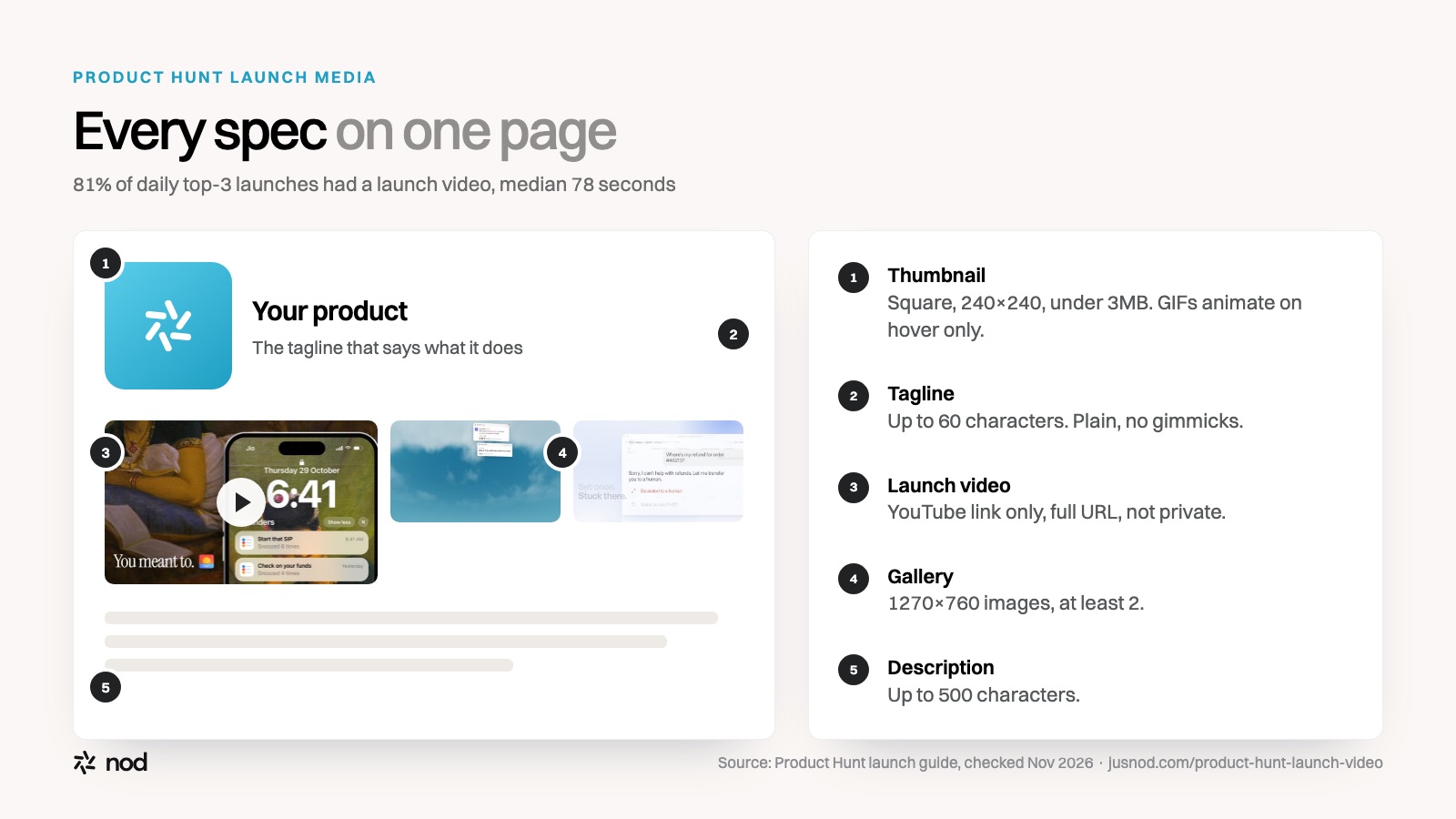
| Asset | Requirement | Notes |
|---|---|---|
| Launch video | YouTube link only; not private; full URL | Optional. Shortened links (youtu.be style) won't load. |
| Thumbnail | Square, 240×240 recommended, under 3MB | Required. GIFs are allowed but only animate on hover, so the first frame must work as a still. |
| Gallery images | 1270×760 recommended | At least 2 images before the gallery shows on your post. GIFs allowed. |
| Tagline | Up to 60 characters | Plain and clear. No gimmicks or over-the-top language. |
| Description | Up to 500 characters | Your value proposition and key features. |
Source: Product Hunt, "Prepare for your Product Hunt launch". Checked November 2, 2026.
The structure that works: a real launch film, scene by scene
Here's how nod's 71-second launch film for Reacher, a money assistant that lives in WhatsApp, is built. Each scene carries one idea and one short on-screen line, so it reads with the sound off.
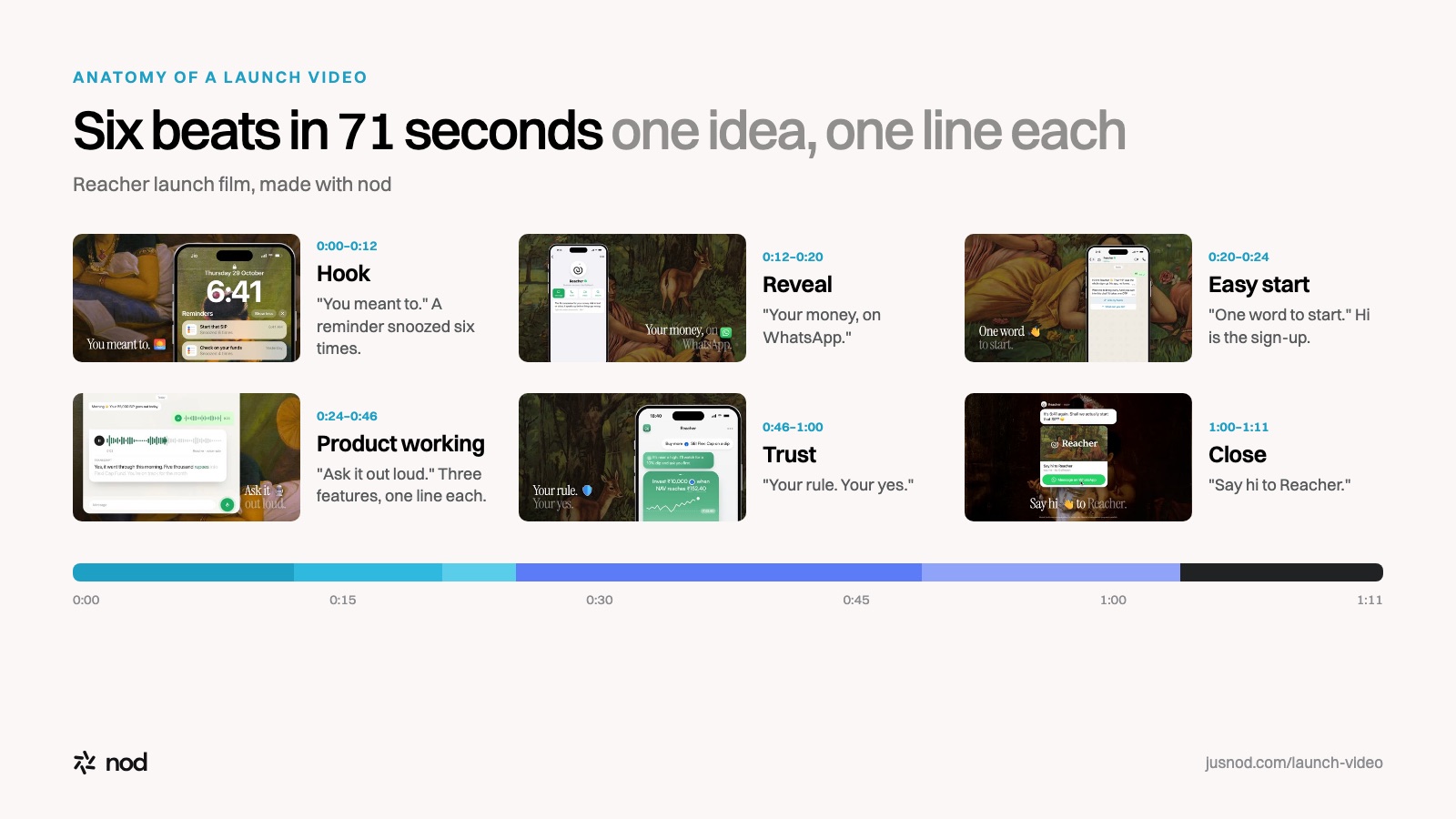
- 0:00–0:12 · Hook: the problem"You meant to." A lock screen at 6:41am. The reminder "Start that SIP" has been snoozed six times. No product yet, just a feeling every viewer recognises.
- 0:12–0:20 · Reveal: what it is and where it lives"Your money, on WhatsApp." The product's profile appears inside an app everyone already uses.
- 0:20–0:24 · Zero-friction start"One word to start." Typing "Hi" is the whole sign-up. This removes the first objection before anyone thinks it.
- 0:24–0:46 · Three features, one line each"Ask it out loud." "Every fund, one chat." "It speaks up first." A voice question answered, a portfolio in one message, a proactive nudge to top up before Friday.
- 0:46–1:00 · Trust and control"Your rule. Your yes." "Awake when you're not." For a money product, the viewer needs to know they stay in charge.
- 1:00–1:11 · Close"Say hi to Reacher." Name, one action, held long enough to read.
The same skeleton fits almost any product: a recognisable problem, the reveal, how easy it is to start, two or three moments of the product working, a reason to trust it, and a close with the name and one action.
What makes a Product Hunt video work
- Show the real product. Product Hunt's own guide says the most successful launches show what the interface looks and feels like. Designed UI moments beat stock footage and avatars.
- One idea per scene, one line per idea. Short two-tone captions like "Every fund, one chat." are easier to follow than paragraphs of voiceover.
- Make it work muted. You'll post the same video on X and LinkedIn, where it autoplays without sound.
- Earn the first five seconds. Open on the problem or the most striking moment, not your logo.
- End on the name and one action. Hold the final frame long enough to read.
- Upload early. Put it on YouTube a few days before launch, check the full URL works logged out, and add it to your draft.
How to make it from your product page
nod turns your product page into a finished launch video in four steps:
- Paste your link. nod reads your page to understand the product, the offer and who it's for.
- Pick a style frame. nod designs style frames in your brand; you choose the look.
- Approve the story. nod writes the storyline and script. Prompt it to change any line, and choose music only or music with a voiceover.
- Export. nod builds the motion graphics and UI scenes, records the voiceover, mixes the music and hands you an export-ready video to upload to YouTube.