Launch video vs explainer, demo and teaser
These get mixed up, and the difference matters because each one is built for a different moment.
| Type | Job | Typical length | Where it lives |
|---|---|---|---|
| Launch video | Create a moment and make people try it | 30–90s | Launch day: Product Hunt, X, LinkedIn, landing page |
| Explainer video | Teach how it works | 60–180s | Website, help center, sales |
| Product demo | Walk through real usage | 2–10 min, or interactive | Sales calls, onboarding, docs |
| Teaser | Build anticipation before access opens | 10–30s | Waitlist, social, countdown |
Types of launch videos
- Product launch video. The main film for a new product. See our guide to the Product Hunt launch video.
- SaaS launch video. A launch film for software, built around real UI moments. See the SaaS launch video maker.
- Feature announcement video. A shorter cut for a meaningful release, so the changelog gets watched.
- Waitlist teaser. A 10 to 30 second tease before you open access.
- App Store preview. A 15 to 30 second video that plays before your screenshots on the App Store.
How long should a launch video be?
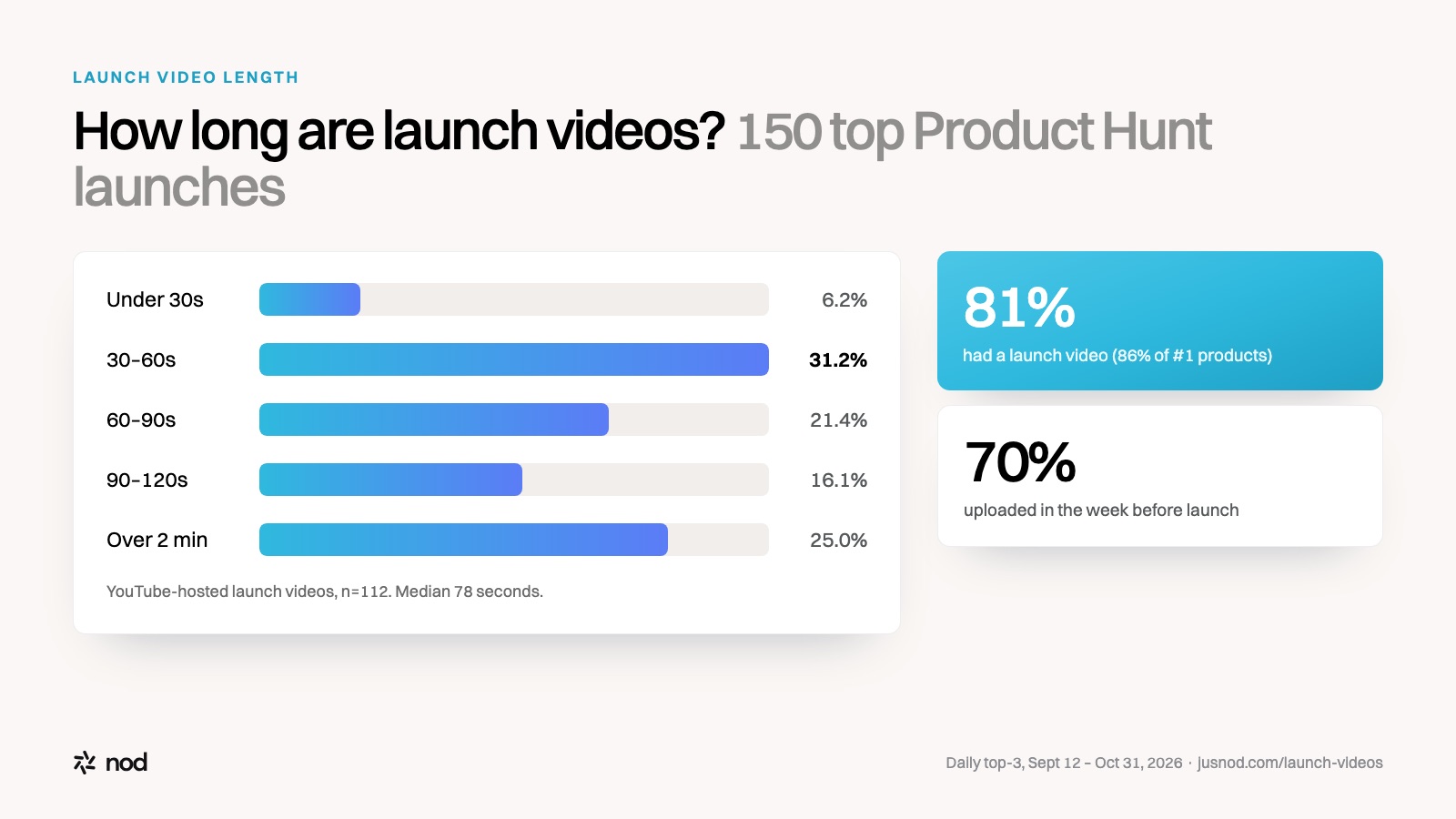
Long enough to show the product working once, short enough that people finish it. In our study of 150 top Product Hunt launches, the median launch video ran 78 seconds and 75% were two minutes or shorter. Platform limits set the outer edges:
| Where | Platform rule | What works |
|---|---|---|
| Product Hunt | YouTube link only, not private, full URL. No length limit stated. | 45–75s |
| X | Up to 140 seconds and 512MB for non-subscribers on the web | 30–60s, captions on |
| 3 seconds to 15 minutes from desktop (10 from mobile), up to 5GB | 30–90s, captions on | |
| App Store preview | 15–30 seconds, up to 3 per device size and language, plays before screenshots | 15–30s |
| Landing page | No limit | 30–90s, first frame works as a still |
Sources: Product Hunt, X Help Center, LinkedIn Help, Apple App Store Connect. Checked November 2, 2026.
The structure of a launch video
Strong launch videos share the same six beats. Here's the shape, with timings from nod's 71-second launch film for Reacher:
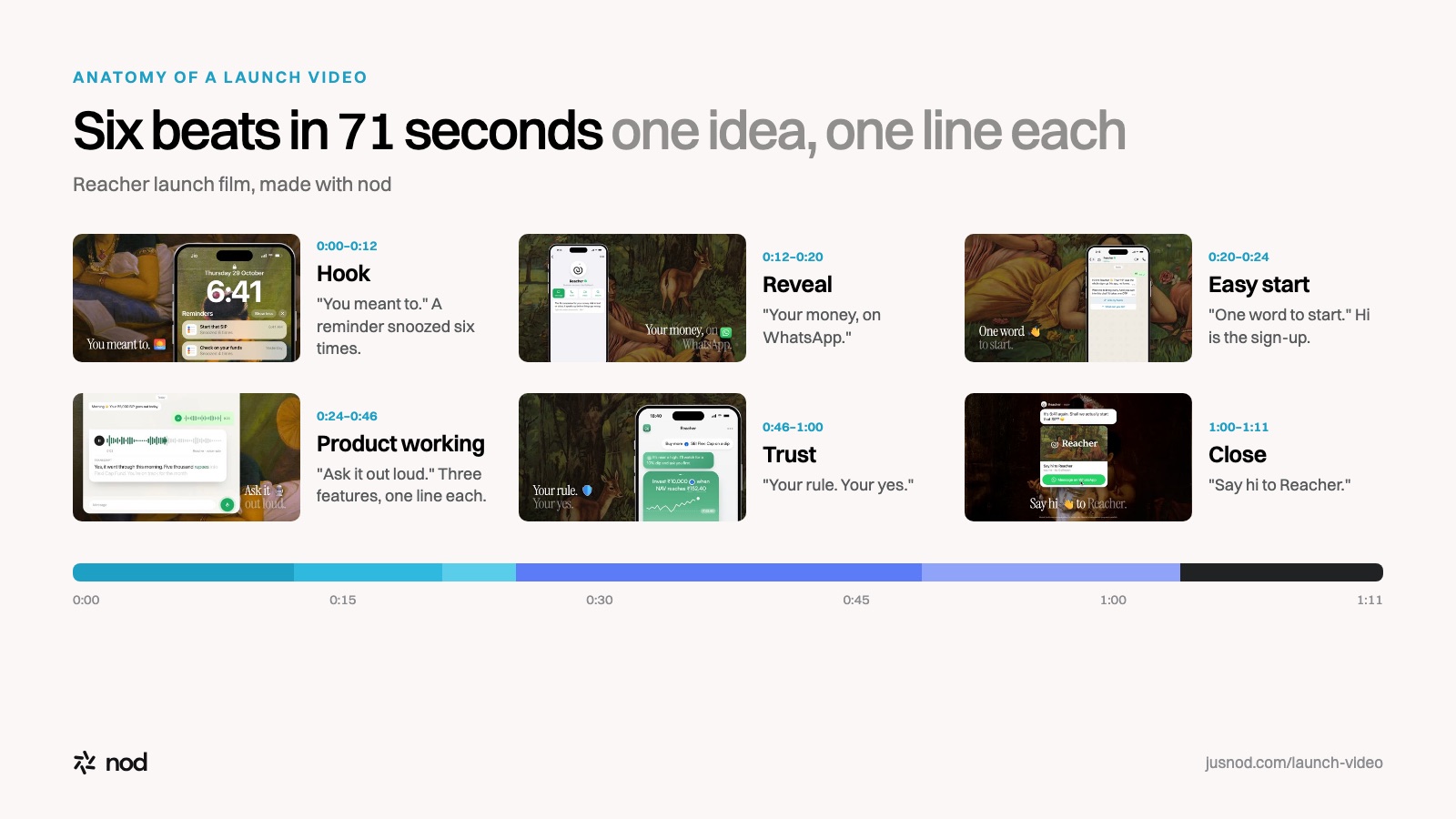
- 0:00–0:12 · HookA problem the viewer recognises. Reacher opens on a reminder snoozed six times: "You meant to."
- 0:12–0:20 · RevealWhat the product is and where it lives: "Your money, on WhatsApp."
- 0:20–0:24 · Easy startRemove the first objection: "One word to start."
- 0:24–0:46 · The product workingTwo or three moments, one line each: "Ask it out loud." "Every fund, one chat." "It speaks up first."
- 0:46–1:00 · TrustWhy it's safe to try: "Your rule. Your yes."
- 1:00–1:11 · CloseName and one action: "Say hi to Reacher."
The full scene-by-scene breakdown is in the Product Hunt launch video guide.
Launch video styles
| Style | Best for | Trade-off |
|---|---|---|
| Motion graphics with designed UI | Software and AI products; clean, on-brand, works muted | Needs a designer or a tool like nod |
| Screen recording | Fast, honest look at the real product | Looks rough unless edited with zooms and pacing |
| Founder to camera | Trust and personality, early-stage launches | Depends on delivery; weak muted |
| Live action | Hardware and consumer products | Most expensive and slowest |
How to make a launch video: four ways
- Do it yourself in an editor such as After Effects, Premiere, Screen Studio or Remotion. Cheapest in money, most expensive in time.
- Hire a freelancer. Roughly $50 to $500 on Fiverr, $850 to $3,500 on Contra. Quality varies with the person.
- Hire a studio. Published prices start around $1,000 (Breadnbeyond), $2,400 to $4,000 (Explainer Video Company) and $5,000 to $8,500 (Yans Media) for a 60-second explainer, with 4 to 8 weeks of production.
- Use an AI launch video tool. nod starts from your product page: it designs style frames, writes a script you edit by prompt, and builds the finished video with motion graphics, UI scenes, voiceover and music for $49.
Launch video checklist
- The first three seconds show the problem or the most striking moment, not a logo.
- Every scene carries one idea and one short line of on-screen text.
- It reads with the sound off.
- It shows the real product, not just abstract graphics.
- It ends on the product name and one action, held long enough to read.
- You have a 16:9 master for YouTube and Product Hunt, and you've checked the first frame works as a thumbnail.
The video is one line of a bigger plan: see the full product launch checklist and how to launch on Product Hunt.